

Blog
I Failed Google Business Profile Video Verification 3 Times. A Live Call Finally Got Me Verified.
A brand-new business, no business cards, no mail, no branded van, and the same rejection three times in a row. Here's how I got verified.
Ryan Kelley Founder, Yellek Solutions LLC Nashua, NH
7 min read
I run a local SEO agency in the Nashua area. Helping businesses with their Google Business Profiles is the job. So it’s a little embarrassing to admit that verifying my own profile took three failed videos and a call with Google support.
I’m writing it up anyway, because if you’re a plumber, a roofer, or anyone else who works out of a truck and a home office, you might be about to hit the same wall. If you just want the how-to, it’s in our guide to Google Business Profile video verification. This is the story of how I learned it the hard way.
It started with a phone code that seemed to work
When I started verification in early September 2026, Google offered me a code over the phone. I took it, and it seemed to go through quickly.
A couple of days later, an email said something was wrong with the verification. From then on, the only option was video.
That’s how it works: Google picks which verification methods you’re offered, and you can’t change them. Looking back, I think I know what set it off. Right after the phone code went through, I edited my business name to add “LLC” to the end. Google says that if you’re asked to re-verify, it’s likely because some business details were recently updated. I can’t prove that’s what happened to me. It’s my best guess, and it’s the first thing I’d tell anyone: get your name exactly right before you verify, and leave it alone afterward.
I researched video verification before I started, because everything I read said the same thing: it fails a lot. So I went in prepared, or thought I did.
A brand-new business with almost nothing to show
I had just formed the company. Since my whole business is Google Business Profile optimization and local SEO, I wanted my own profile live fast. It would be evidence I could point to while I worked on landing my first clients.
Moving that fast meant I had:
- No business cards.
- No physical mail with my business name on it.
- No company vehicle, and none planned, so no van with a logo on the side.
- No office sign, because I work from home.
Very few physical things said “Yellek Solutions.” What I’d read said a service-area business could show equipment in its home office and film itself unlocking the house. I built my plan around that.
Attempt 1: my shot plan
I planned the video as one walk:
- Start at the sign for my street, then walk home and show the house number.
- Record myself unlocking the front door and walking into the den.
- At my workstation in the den, show my LLC document, a custom app I’m developing, and me logging in to my website host with an email on my business domain, to show control and ownership.
Based on everything I’d read, that should have covered it. It didn’t. Five days later, I got the rejection.
The same rejection, three times
Here’s the screen Google showed me:
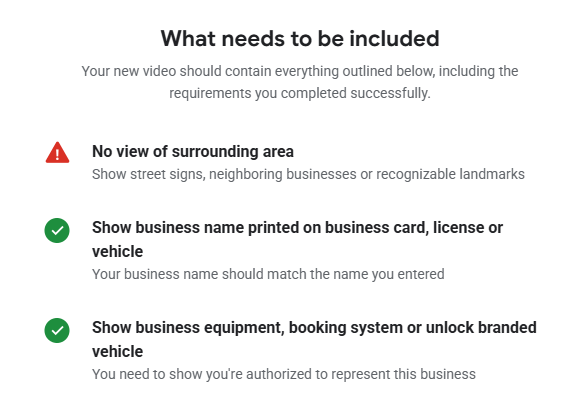
The screen was headed “What needs to be included.” Two items had green checkmarks. The name check passed on the first try, thanks to the LLC document I’d shown:
- Show business name printed on business card, license or vehicle. “Your business name should match the name you entered.”
- Show business equipment, booking system or unlock branded vehicle. “You need to show you’re authorized to represent this business.”
One item was red:
- No view of surrounding area. “Show street signs, neighboring businesses or recognizable landmarks.”
There was also a line I’d underline for anyone reading this: “Your new video should contain everything outlined below, including the requirements you completed successfully.” You can’t just film the missing piece. You re-shoot the whole thing.
I got that same reason all three times.
Attempts 2 and 3: chasing the street sign
The red item was about my surroundings, so that’s where I put my effort.
Attempt 2. The sign I’d filmed the first time used an abbreviation of my road’s name. A sign further down had the full name, so I re-shot with that one. Two days later: failed.
Attempt 3. I live in a rural neighborhood with no real landmarks, so I went bigger. I started at the large wooden sign at the entrance to the neighborhood, drove in and showed the street sign, then drove home and repeated everything else. The email made it look like the area footage was the problem, so I gave it as much area as I could. Two days later, it failed again.
After the third rejection, the email said a call with support was the only option left.
The live video call that finally worked
I was able to schedule the call fairly quickly, for a time I knew I’d be free. It took about 15 minutes. It would have been shorter if I’d had fewer questions and the physical items to prove I owned the business.
The expectations on the call weren’t much different from the video. The big difference was that I could ask questions. For the first time, I could find out what they actually wanted instead of guessing from an email.
I still didn’t have a vehicle to unlock, physical business cards, or physical mail. So I showed what I did have: a digital business card (I have one now) and a PDF of an invoice, with my business name on it, for online services the company had signed up for.
That call passed. I was verified.
I can’t tell you how Google weighed any of it. What I know is that the thing that changed between failing and passing wasn’t more street signs. It was talking to a person I could ask, with documents in hand that carried my business name.
What I’d tell a plumber or roofer before they hit record
These are lessons from my own experience, not Google rules. Google’s actual requirements are in the guide.
- Have physical proof ready before you start. Printed business cards, mail, or an invoice with your business name on it. Having those would have made the whole thing less stressful for me. Google lists business cards as proof the business exists, and a permit, invoice, or utility bill matching your profile name as proof you manage it.
- Don’t rush it like I may have. I wanted the profile up so badly that I started before the business had much of a paper trail. Looking back, I may have moved too fast.
- If you have a branded truck and real tools, use them. I think anyone with physical business assets would have a much easier time with the video than I did. A van and gear are exactly what I was missing.
- Read the green checkmarks too. Google’s screen said a new video has to include the items you already passed. Plan every re-shoot as a complete video.
- If you get a live call, ask questions. That conversation told me more than three rejection emails.
Why I’m sharing this
I’d rather you learn this from my mistakes than from your own fourth attempt. And when I help a client with their profile now, I’ve been through the frustrating parts on mine. If you’re getting ready to record, start with the video verification guide.
If your verification is stuck, or your profile is live but not showing up, we’ll take a look at it for free. I can’t promise Google will verify anyone; Google makes that call. But I can help you go in with clear, honest proof. You can also read more about our Google Business Profile optimization work.
Verification stuck, or live but not showing up? I'll look at your profile for free. No promise Google will verify; that's Google's call.
Get a free profile audit